Two critical PHP remote code execution flaws (CVE-2026-109618, CVE-2026-109619) are fixed in PHP 8.5.12, 8.4.27, 8.3.36 and 8.2.35. ForgeKit ships them out of the box.
I Used XAMPP for Years. Then I Built My Own Alternative for Windows
I used XAMPP for years, moved to Laragon, and eventually built ForgeKit because I wanted several PHP versions and independent environments running at the same time on Windows.
The short answer
Laragon: the closest lightweight upgrade from XAMPP. Free for non-commercial use only; client work needs a paid licence, from $49 a year (Laragon's licence explained).
Laravel Herd: the most polished choice if you mostly build Laravel. Databases, Redis and mail catching need Herd Pro, $99 a year.
WampServer: the classic stack most similar to XAMPP. Free.
FlyEnv: a broad runtime manager across several languages. Free, with an optional $10 licence that removes evaluation limits.
ForgeKit (made by me): free, including for commercial work, and built for running several PHP versions, old ones included, at the same time.
Mostly for my own projects, experiments and occasional client work. At my day job I used macOS, where MAMP Pro showed me how polished a local development environment could feel, but MAMP was only for macOS. On my own Windows machines, XAMPP remained the familiar option.
It generally worked, although I remember plenty of slight annoyances and a few occasions when it broke for reasons I honestly cannot remember anymore.
There were port conflicts, services that did not want to start, and times when I had to search through logs and configuration files to work out what had gone wrong. MySQL caused me trouble more than once. Updating PHP or keeping an old PHP version available was never particularly pleasant either.
I was happy to get rid of XAMPP when I eventually moved on.
Strangely, I now miss it a little.
Maybe I have become one of those old-fashioned web developers who clings to the past. XAMPP reminds me of a time when web development felt simpler. You installed Apache, PHP and MySQL, put some files inside htdocs, refreshed the browser and hoped for the best.
Or perhaps that is just what my rose-tinted glasses tell me.
Sentimentality aside, XAMPP is still widely used and still taught in universities. I regularly see students trying to follow coursework built around it and getting stuck when Apache refuses to start, a port is already taken, or their setup behaves differently from the tutorial.
It introduced an enormous number of people to PHP, including me.
But if you are currently searching for an XAMPP alternative for Windows, there is probably a reason.
Then I found Laragon
When I bought a new Windows laptop, I discovered Laragon.
I was amazed by how much simpler it felt than XAMPP while also seeming more resilient. Local domains were easier. The interface was cleaner. Things started properly more often.
Maybe Laragon was simply better at hiding the parts I did not need to think about every day. Whatever the reason, I liked it a lot back then.
I assumed it would be my permanent Windows development setup.
Then I realised I could not run two PHP versions at the same time.
By this point, I had accumulated quite a few projects and experiments. Some were old. Some were new. Some belonged to clients and could not simply be upgraded because I felt like using a newer PHP version that afternoon.
I wanted one project running PHP 5.6, another running PHP 7.4 and another running PHP 8.1, all at the same time.
Switching the active PHP version globally was useful, but it still meant changing the environment underneath every project.
That started to annoy me.
Surely building something better could not be that hard
Well, it was hard.
The architecture was hard. Starting and stopping services reliably was hard. Port management was hard. Supporting different generations of PHP, Apache, Nginx, MySQL and MariaDB was hard.
The bloody Windows backslash and forward-slash differences in PowerShell made me hate the entire project for one afternoon.
But I had no idea how much fun I would have.
I loved almost every minute of the months I spent building ForgeKit v1.0.
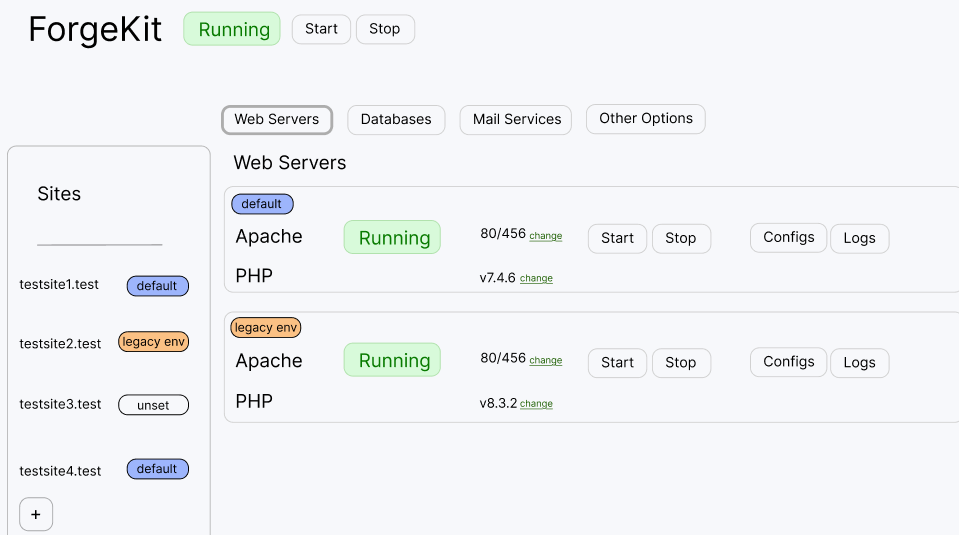
Check out how ugly it was in the pre-alpha state lol
An early ForgeKit alpha, before the v1.0 release. It has come a long way since.
Eventually, I arrived at an architecture that felt both powerful and surprisingly simple:
Runtimes are the installed versions of PHP, Apache, Nginx, MySQL and MariaDB.
Instances are independent servers created from those runtimes.
Sites are projects connected to a particular web-server instance.
The easiest way to describe it is that ForgeKit lets you run several Laragon-like environments at the same time, while managing all of them from one application.
One project can use PHP 5.6 with Apache.
Another can use PHP 7.4.
Another can use PHP 8.1 or PHP 8.4 with Nginx.
They can all run simultaneously without globally switching the PHP version underneath everything else. And this was bloody amazing. I could not believe nobody before had done anything like it, and weirdly enough, still nobody has. The best you can hope for is multiple PHP instances on different ports in Nginx, and that does work, but nowhere near as elegant as this.
I'm a simple guy so I wanted a simple tool
I spent years designing websites, and I always admired interfaces that made it almost impossible to become lost.
You know the kind of website where the correct action feels obvious? You do not need to stop and wonder which button is dangerous or whether clicking something will destroy your work.
That was the philosophy I wanted for ForgeKit.
Developers sometimes accept bad interfaces because we assume technical users should be able to tolerate them. I do not agree. Programmers benefit from clear design just as much as everybody else.
Adding a project in ForgeKit should be simple:
Choose the project folder.
Choose the local domain you want.
Choose the environment it should use.
Start coding.
But I did not want simplicity to mean losing control.
One thing I always liked about XAMPP was that it allowed you to see the configuration files and logs. As I began to understand the open-source tools underneath it, I wanted more access to them, not less.
Apache, Nginx, PHP and MySQL are powerful tools. I want to be able to see what they are doing. I want access to their logs. I want to open the real configuration files and change anything I need.
Some newer tools hide most of that machinery.
Looking at you, Laravel Herd.
I want simplicity and power.
ForgeKit gives you a friendly interface for normal work, but it does not pretend the underlying services are proprietary magic. The actual configurations and logs remain available when you need them.
Old PHP is still real PHP
A lot of new development tools focus almost entirely on the newest PHP releases.
That makes sense if every project you work on started recently.
Real client work is not always like that.
There are still companies running PHP 5 applications. There are still enormous numbers of PHP 7 projects. Freelancers and agencies regularly inherit applications that nobody wants to rewrite but somebody still needs to maintain.
That is not cutting-edge work, as some gatekeepers in technology would probably be eager to tell you.
It is, however, necessary and extremely down to earth.
XAMPP has historically been useful here because old versions remain available. I wanted ForgeKit to retain that ability rather than pretending every developer lives permanently on the latest release.
Because the runtimes are modular, you can keep PHP 5.6 installed for one old project while using PHP 8.4 everywhere else.
They do not need to fight each other.
I recently added support for MySQL 5.6 and older. Those versions were released in 2013, more than a decade ago. But if that is what an old client project needs, that is what it gets.
Trying ForgeKit does not mean removing XAMPP
You do not need to uninstall XAMPP or migrate your entire development life in one afternoon.
To try an existing project in ForgeKit:
Install the ForgeKit .exe wherever you want.
Add your project's folder and choose the local domain you want.
Start the site.
That is it. Your code is running and you are ready to work.
You can optionally choose a different PHP version or add another environment in parallel.
You can also leave the existing database running inside XAMPP. ForgeKit does not require you to move everything at once.
You can keep XAMPP and all of its files exactly as they are. The only important thing is stopping XAMPP's Apache service if it is already occupying port 80, because ForgeKit's local router needs that port too.
Trying ForgeKit is not a permanent commitment. Give it one project and see how it feels.
A few other XAMPP alternatives
Laragon is still one of the most obvious upgrades from XAMPP for Windows developers. I used it myself and loved it. ForgeKit might not exist without it. One thing to know: its free version is for non-commercial use only, so client work needs a paid licence.
Laravel Herd is polished and particularly attractive when most of your work is Laravel. However, database management and several other useful services require Herd Pro, and it hides more of the underlying configuration than I personally prefer.
There are also broader runtime managers such as FlyEnv and traditional tools such as WampServer.
I am deliberately not including Docker here. Docker can solve local development problems, but it is a different type of product and a different way of working. Someone who specifically wants Docker is probably not choosing between it and a native XAMPP replacement.
For a closer look at how these (and a few others) actually compare on pricing, licensing, and concurrent PHP versions, see the full local PHP environment comparison.
So, should you replace XAMPP?
If you are completely happy with XAMPP, keep using it.
But you probably did not find this article because everything was perfect.
ForgeKit takes less time to set up than it took to read this far. You do not have to remove XAMPP, rebuild your database or commit to migrating every project.
Just try one.
XAMPP was great back then because times were great back then, or at least that is what my rose-tinted glasses tell me.
Today, ForgeKit is great for me and for a growing group of other Windows developers.
If it becomes great for you too, let me know. I would genuinely love to hear what you think.
The interactive preview, right here
The full ForgeKit interface, running as an interactive browser demo. Add a site, assign it a PHP or Node version, and open a simulated project terminal, without installing anything.
It depends what's bothering you about XAMPP. Laragon is the closest lightweight upgrade. Laravel Herd is the most polished choice if you work almost entirely in Laravel. ForgeKit is built specifically for developers who need several PHP versions, including old ones, running at the same time on separate projects, with nothing hidden from you.
Is there a free alternative to XAMPP?
Yes. FlyEnv and ForgeKit are both free to use on Windows with nothing gated. Laragon is free for non-commercial use only (with a startup licence popup); commercial work, including client projects, needs a paid licence.
Can I run multiple PHP versions at the same time instead of switching with XAMPP?
Yes, but not with XAMPP itself, official guidance there is a separate XAMPP copy per version. ForgeKit was built around this exact problem: separate PHP, Apache, and Nginx instances can run simultaneously as independent Windows processes, so one project can stay on PHP 5.6 while another runs PHP 8.4.
Do I have to uninstall XAMPP to try an alternative like ForgeKit?
No. ForgeKit installs into its own folder and doesn't touch your existing XAMPP install or files. The one thing to check is that XAMPP's Apache isn't already holding port 80, since ForgeKit's local router needs it too.
What can I use instead of XAMPP for local PHP development on Windows?
Laragon, Laravel Herd, FlyEnv, WampServer, Docker/WSL, and ForgeKit are the main native or containerised options for Windows. Each models a "local environment" differently; the full comparison guide breaks down pricing, licensing, and PHP-version handling for each.
Is ForgeKit open source?
No. ForgeKit is closed source, but it's free to use with no paywalled features or accounts, and no telemetry required (anonymous usage stats are optional). The public GitHub repo is for issues and discussions, not the application's source code.
If XAMPP is causing more friction than it's worth, ForgeKit is a free, native Windows alternative built around running several PHP versions side by side, with nothing hidden from you.