Architecture
ForgeKit is designed around a simple model:
Binaries → Instances → Sites
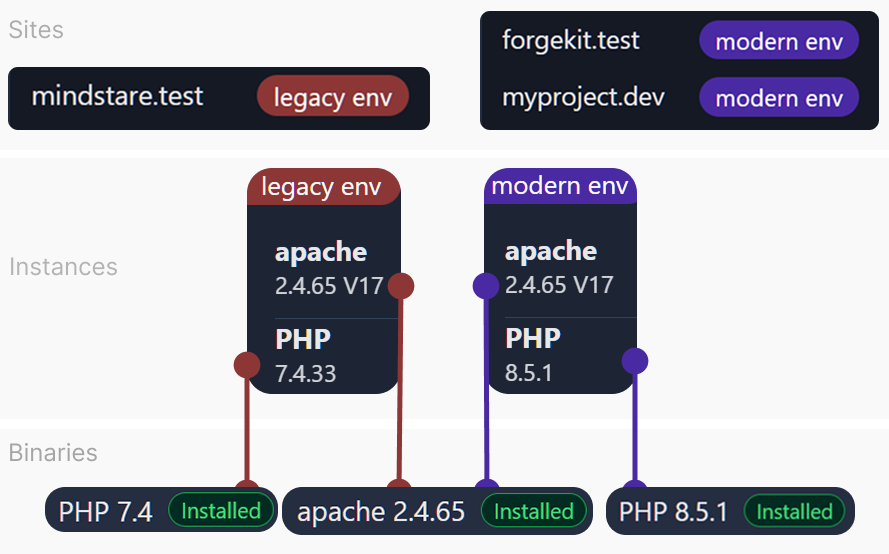
- Binaries are versioned runtimes (PHP, Apache/Nginx, MySQL/MariaDB) which are installed in
/bin. By default they don't do anything and are waiting to be used.
- Instances are running web servers (Apache/Nginx + configs + PHP) or database servers (mysql, mariaDB) which are based on the binaries and run independent of eachother in
/instances.
-
Sites are the configurations needed to serve a site properly and have 3 elements:
- The folder in which the site's files are located. This is the ForgeKit installation folder
/sites/myprojeect. - The windows host file configuration for that site's domain. Something like:
127.0.0.1 myproject.devThis makes sure when you go to the domain specified, windows knows to point it to your local machine.
- The Vhost for that site. If the site is connected to an instance or web server then the site's details are also added to that instance's vhosts.conf file.
- The folder in which the site's files are located. This is the ForgeKit installation folder
This separation is what lets ForgeKit run multiple projects with different PHP versions and configurations at the same time.
The mental model
Binaries (versions)
You install versions once:
- PHP 8.3, PHP 7.4, etc.
- Apache 2.4.x / Nginx x.x
- MySQL/MariaDB versions
ForgeKit stores these in a predictable folder structure and reuses them across Instances.
Instances (servers)
An Instance is a configured server that can run:
- Apache + PHP 8.3
- Nginx + PHP 7.4
- etc.
Instances define:
- which web server binary they use
- which PHP version they run
- which ports they listen on
- where config and logs live
You can mix and match any number of versions without any limitations and run them all at the same time.
A binary is only the installed version of a tool. It does not mean there is only one running server.
For example, you may have one Apache binary installed:
/ForgeKit/bin/web/apache/2.4.65/
But ForgeKit can create multiple Apache instances from that same binary:
/ForgeKit/instances/web/web-apache-2-4-65/
/ForgeKit/instances/web/web-apache-2-4-65-1/
Both instances use Apache 2.4.65, but they are separate configured servers. Each one can have its own ports, PHP version, vhost file, logs, and running process.
Same Apache version does not mean same Apache instance.
Sites (vhosts)
A Site is:
- a domain name (
something.test) - a folder on disk (your project)
- routed to one Instance
A site belongs to one web-server instance. If two sites use different instances, they will appear in different vhosts.conf files, even if both instances use the same Apache or Nginx version.
ForgeKit writes the vhost rules and updates hosts so your domain resolves locally. All of these are accessible from the Configs dropdown buttons or the hosts file button
Why this architecture matters
This model prevents the usual local-dev pain:
- no global “one PHP version for everything”
- no manual vhost editing
- easier debugging (logs/config are per instance)
- multiple projects can run in parallel without conflicts
Continue to → Binaries and Runtimes
Or check → Performance
New here? → How ForgeKit Works is a lighter, practical walkthrough of this same model.