Mailpit
Mailpit is included as a local email catcher. It catches any mail your local sites try to send and shows it to you in a web inbox, so nothing ever leaves your machine.
It allows you to:
- Catch mail sent by PHP's built-in
mail()function - Catch mail sent over SMTP by Laravel, Symfony, Node, or any other framework
- View the HTML and plain text version of each message
- Run more than one inbox at once, each isolated from the others
Creating an inbox
- Open the MailPit Inboxes tab.
- Click Start your first inbox (or Add another inbox if you already have one).
- Pick an installed Mailpit version, give the inbox a name and color, and submit.
- Start it from its card once it has been created.
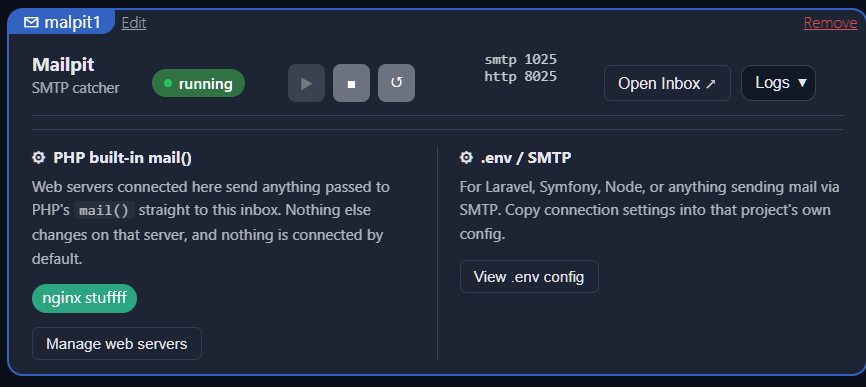
Each inbox shows its SMTP port, its web UI port, and a status pill. Use Open Inbox to view captured mail in your browser.
Two ways to connect a project
Sites reach an inbox in one of two ways, and connecting one does not connect the other. Nothing is wired up automatically, so no existing site starts sending mail somewhere new without you choosing it.
PHP's built-in mail()
If your code calls PHP's mail() function directly, connect the web server that runs it:
- On an inbox's card, click Manage web servers.
- Find the web server and click Add.
- If that web server is already connected to a different inbox, the button reads Move here instead, and clicking it disconnects the old inbox and connects the new one.
Connecting a web server only affects mail() calls on that server. It does not touch any site's own configuration files, and it never sends mail anywhere but the connected inbox.
.env / SMTP
Laravel, Symfony, Node, and most other frameworks send mail through their own SMTP client instead of mail(). For these, click View .env config on an inbox's card and copy the block into that project's own configuration:
MAIL_MAILER=smtp
MAIL_HOST=127.0.0.1
MAIL_PORT=1025
MAIL_USERNAME=null
MAIL_PASSWORD=null
MAIL_ENCRYPTION=null
Symfony uses a single DSN string instead:
MAILER_DSN=smtp://127.0.0.1:1025
For anything else, point it at 127.0.0.1, the inbox's SMTP port, with no authentication and no TLS.
Running more than one inbox
Since a single Mailpit process has no concept of separate mailboxes internally, isolating mail between two projects means running two inboxes rather than sharing one. This is the same reasoning behind having multiple web server or database instances: each one is independent, and a web server can only be connected to one inbox at a time.
If LAN access is turned on, an inbox becomes reachable from other devices on your network at your machine's LAN IP and the inbox's own port, the same way web servers do.
How it works
Mailpit is a small, self-contained binary with no configuration file of its own. Each inbox is one running Mailpit process with its own SMTP port, web UI port, and local database file, all created under ForgeKit's own instance folders.
It only runs while its card shows as running. Stopping an inbox stops that process, and mail sent to it while it is stopped simply fails to send, the same as it would against any other unreachable SMTP server.
Security note
Mailpit runs locally inside your ForgeKit environment. Mail sent to a connected inbox is captured and stored on your own machine, never delivered to a real mail server, and never reaches the address it was addressed to.
It is not exposed publicly unless you deliberately expose your local server.