Where are ForgeKit logs stored?
ForgeKit's log layout follows the same shape a real Apache/Nginx server has.
It just keeps every piece of it inside C:\ForgeKit instead of scattered
across /etc, /var/log, and your project folder.
There are a handful of logs to know about, in the order you'd normally check them for a site issue:
| # | Log | Filenames | Explanation | Location |
|---|---|---|---|---|
| 1 | Site's logs | access.log / error.log |
Generated by the vhost for that site in (Apache/Nginx) | /ForgeKit/logs/sites/{domain}/ |
| 2 | Web server's logs | access.log / error.log |
The web server's main/default context (not tied to any one site) | /ForgeKit/instances/web/{instance_folder}/logs/ |
| 3 | PHP logs | php_error.log |
PHP itself | /ForgeKit/instances/web/{instance_folder}/logs/ |
| 4 | PHP fallback log | php-{version}.log |
Used when PHP runs outside any instance context; usually empty | /ForgeKit/logs/php-fallback/ |
| 5 | Database's error log | mysql-error.log |
That database instance's own server error log | /ForgeKit/instances/databases/{instance_folder}/logs/ |
| 6 | phpMyAdmin runtime logs | phpmyadmin-runtime.log / phpmyadmin-runtime-error.log |
ForgeKit's own PHP server that serves the phpMyAdmin UI - shared by every database, not per-database | /ForgeKit/logs/ |
1. Per-site (vhost) logs: check these first
On a real server, each Apache <VirtualHost> or Nginx server{} block usually
sets its own ErrorLog/CustomLog (or access_log/error_log) so that one
site's traffic doesn't get lost in another site's noise. ForgeKit generates
the exact same thing. Here's what an actual generated vhost looks like:
<VirtualHost *:8081>
    ServerName forgekit.test
    DocumentRoot "C:/ForgeKit/sites/forgekit-site/public"
    <Directory "C:/ForgeKit/sites/forgekit-site/public">
        Options FollowSymLinks
        AllowOverride All
        Require all granted
    </Directory>
    ErrorLog "C:/ForgeKit/logs/sites/forgekit.test/error.log"
    CustomLog "C:/ForgeKit/logs/sites/forgekit.test/access.log" common
</VirtualHost>
Because these directives live inside the site's own block, only requests and errors for that domain end up here. It's the first place to check when one site is broken but everything else on the same instance works fine.
Open these from the Logs button on the site itself, or browse to:
/ForgeKit/logs/sites/{domain}/access.log
/ForgeKit/logs/sites/{domain}/error.log
2. Web-server instance logs
This is the part that mirrors a real server's own /etc/apache2 or
/etc/nginx logs: the web server's main context, outside of any specific
vhost. Every instance (an Apache or Nginx you've created in ForgeKit) has one:
/ForgeKit/instances/web/{instance_folder}/logs/access.log
/ForgeKit/instances/web/{instance_folder}/logs/error.log
Since these are set at the top level of httpd.conf/nginx.conf rather than
inside a <VirtualHost>, they catch whatever a per-site block doesn't:
startup errors, port conflicts, module load failures, and any request that
didn't match a known vhost. Open them from the Logs button at the top of
a web server's row.
3. PHP's error log: a separate log, on purpose
Just like a real server usually keeps PHP's own error log separate from
Apache/Nginx's (e.g. a dedicated php-fpm log next to, but distinct from,
the web server's), ForgeKit gives PHP its own file:
/ForgeKit/instances/web/{instance_folder}/logs/php_error.log
This lives in the same instance folder as #2, but PHP writes it, not the
web server, and it's shared by every site running on that instance, not
per-site (there's no php_error.log per domain). Open it from the second
Logs button: the one under the PHP section of a web server's row, below
the web server's own Config/Logs buttons.
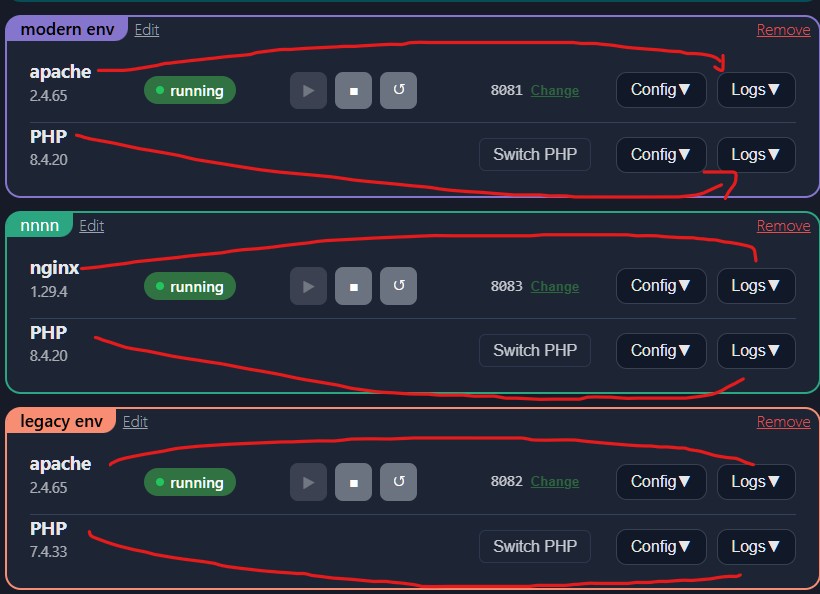
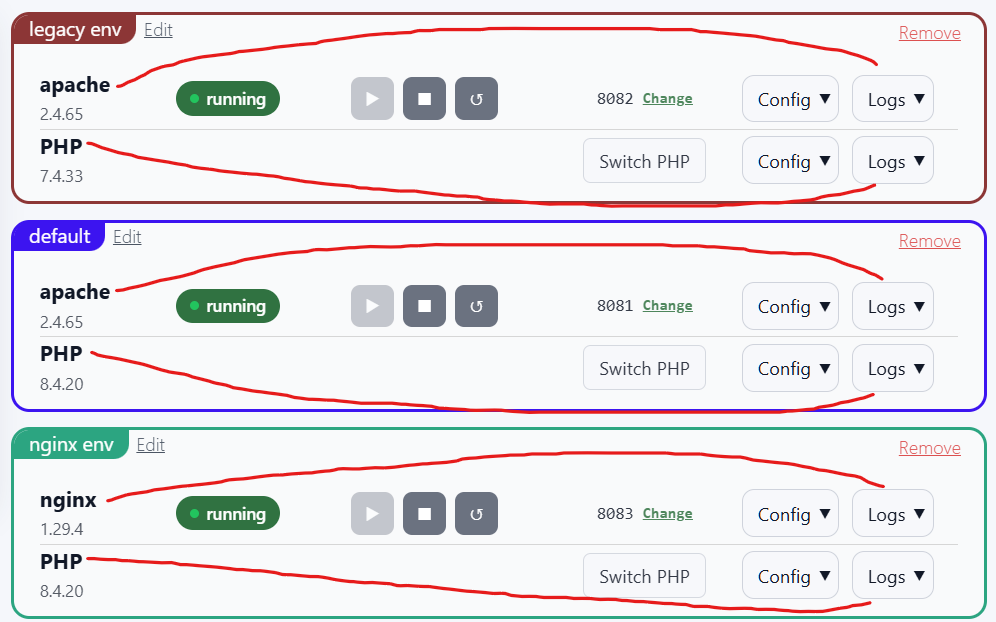
Each web server row has two Logs buttons: the top one (next to Config)
opens the web server's own access.log/error.log from #2, and the bottom
one (under the PHP row) opens PHP's php_error.log from this section. There's
one per instance, shared by every site on it.
If a site throws a PHP error/warning, check this file if it isn't showing up
in the per-site error.log.
4. PHP fallback log (rarely relevant)
Each installed PHP binary/version also has a neutral fallback log:
/ForgeKit/logs/php-fallback/php-{version}.log
This exists so that PHP always has somewhere safe to log to even when it's being run outside of any web server instance (for example, directly from the terminal, or by phpMyAdmin). Normal site traffic is always handled by #1-#3 above, so this file usually stays empty during regular usage. That's expected, not a bug.
5. Database instance's error log
Every database instance (a MySQL or MariaDB you've created in ForgeKit) has its own error log, separate from anything web-server related:
/ForgeKit/instances/databases/{instance_folder}/logs/mysql-error.log
This is the database engine's own log - connection failures, startup errors, crashes. Open it from the Logs button on the database's row, or from the "Database server" section of its phpMyAdmin panel. Check this first if a database won't start, or if phpMyAdmin loads but can't connect to it.
6. phpMyAdmin runtime log (not the same as #5)
phpMyAdmin runs behind its own bundled PHP server, independent of the database it's connected to and independent of any web server instance:
/ForgeKit/logs/phpmyadmin-runtime.log
/ForgeKit/logs/phpmyadmin-runtime-error.log
These cover the runtime process that serves the phpMyAdmin web page itself
- not the database. If phpMyAdmin's page won't load or looks broken, check here. If the page loads fine but a specific database won't connect, check that database's own error log (#5) instead. Open both from the "phpMyAdmin runtime" section of the phpMyAdmin panel.
Which log should I check first?
If one site is broken but another site on the same instance works fine:
- Check that site's per-site log (#1).
- Check the PHP error log for that site's instance (#3).
- Check the web-server instance log (#2).
- Check the generated vhost config for the instance the site uses.
- Check the PHP fallback log last (#4). It's usually empty by design.
If the web server won't start at all:
- Check the web-server instance log (#2).
- Check for port conflicts.
- Check the generated config files.
- Restart the instance.
If a database won't start, or phpMyAdmin can't connect to it:
- Check that database's own error log (#5) first - most connection/startup failures show up here.
- If phpMyAdmin's page itself won't load (not just one database), check the phpMyAdmin runtime logs (#6) instead.
- Check for port conflicts on the database's port.
- Check
my.inifor anything hand-edited that might be invalid - see Logs and Config Files.
See also → Logs and Config Files · Instances · Vhosts and Routing · How ForgeKit Works